Showing posts with label Linux. Show all posts

Wednesday, July 20, 2022

Membuat Bootable UFD Installer (Multi) OS Bagian ke-2: Ventoy


Biasanya satu image ISO / OS hanya bisa ditulis ke satu UFD. Bagaimana kalau kita mau image-image tersebut dalam satu UFD sekaligus? Ada artikel yang pernah dipublish penulis  di tahun 2018, 'Creating Bootable USB OS Installer' yang membahas aplikasi multisystem. Kali ini penulis akan membahas aplikasi sejenis yaitu Ventoy:

Ventoy
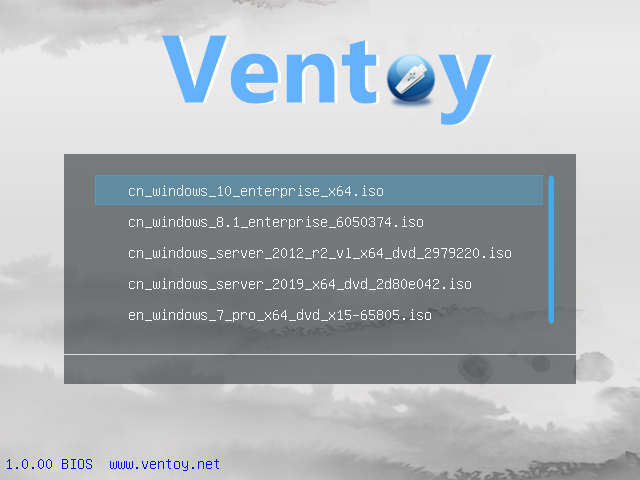
Berikut caranya:
  1. Download Aplikasinya & ekstrak dalam folder pilihan anda
  2. Jalankan  aplikasinya, 
    1. gunakan ini di terminal dalam folder aplikasinya:
      $sudo ./VentoyGUI.x86_64
    2. Pilih USB flashdisk  (UFD) yang akan digunakan Multi ISO Installer
    3. Pilih tipe partisi. MBR untuk PC yang hanya memakai BIOS  (Non UEFI), GPT untuk PC baru)
    4. Pilih Install


  3. Aplikasi akan membuat 2 partisi/volume di UFD Anda, pertama untuk boot (VTOYEFI), ke-2 untuk menyimpan image OS (Ventoy).
  4. Copy image OS Anda (*.iso) ke Partisi ke-2 (Ventoy)
  5. Boot ke USB
Anda dapat menempatkan file ISO sebanyak mungkin di partisi ke-2 karena prosesnya cuma cut/copy & paste sederhana, tidak perlu konfigurasi lebih lanjut.

ISO Image yang penulis uji:
  1. Image / Installer OS Linux: Linux Mint, Linux Mint LMDE, Ubuntu, POP_OS!, Manjaro & Chimera OS. Tentunya akan bisa berfungsi dengan image / installer OS Linux lainnya di luar sana.
  2. Image / Installer OS Windows: Windows 7 / 8.1 / 10. Tiny10 (Windows 10 Enterprise LTSC minimal)  adalah pengecualian, dia lebih berfungsi sebagai image tunggal (Anda bisa menggunakan multisystem atau balenaEtcher untuk menulis ISO ke UFD)
  3. ISO Utilitas: Parted Magic, UBCD, UBCD Live. Beberapa utilitas seperti G4L (HDD Cloning) dan ISO Antivirus populer, menolak untuk boot


Sunday, July 17, 2022

How to Manually Turn-Off Windows Fast-Start HDD Lock from Linux

If you dual-boot your Linux with Windows 8.x/10 (usually for gaming), you may experienced that you cannot write or possibly your NTFS drive whether they used as system or data only. This usually caused by Windows Fast-Start HDD Lock 

Current solution is to Disable Windows Fast-Start from within Windows. It requires you to boot to Windows, turn-off the fast-start from Settings - Power Option - Choose what the power buttons doChange settings that are currently unavailableShutdown settings - uncheck the Turn on fast startup - full shutdown Windows - reboot to Linux

Should it failed then you can force to Turn-Off Windows Fast-Start HDD Lock  from your Linux. There is the ntfsfix command (part of the ntfs-3g package), which repairs some NTFS inconsistencies, resets the NTFS journal file and schedules a NTFS consistency check for the first boot into Windows. This might corrupt your Windows installation though, so it's not recommended for system drive

However it can be useful in some cases. For example, if you're no longer have Windows 10 or 8 installed, but a NTFS partition was left in a hibernated state (Locked). In such cases, you could use: 

sudo ntfsfix /dev/<NTFS_partition> (for example /dev/sdb1) 

to get the partition to mount with full read/write access.

source: https://www.linuxuprising.com/2019/01/fix-windows-10-or-8-partition-mounted.html


Thursday, October 22, 2020

Game DRM-Free

Apa itu Game DRM-Free? English version

Untuk tahu lebih jauh berikut definisi DRM menurut Wikipedia:

Peralatan Manajemen Hak digital (Digital Rights Management (DRM) adalah seperangkat teknologi kontrol akses untuk membatasi penggunaan perangkat keras berpemilik dan karya hak cipta.Teknologi DRM mencoba mengontrol penggunaan, modifikasi, dan distribusi karya berhak cipta (seperti perangkat lunak dan konten multimedia), serta sistem di dalam perangkat yang menerapkan kebijakan ini.

Pada dunia game di PC atau PC Game, DRM sering disebut sebagai copy-protection. Ada bermacam-macam copy protection yang ada sejak era PC Game dimulai (1980an),  

  • proteksi fisik media (laser hole atau hidden file/sector pada floppy disk atau CDROM),  
  • proteksi yang mengacu ke buku petunjuk/manual (misalnya 'masukkan kata dari halaman (x) paragraf (y) dan kata ke-(z)')
  • proteksi serial number unik (seperti Windows 95/98)
  • proteksi one-time online/phone registration (seperti Windows 7 ke atas)
  • proteksi periodik/selalu online (seperti DVD game dengan sistem Denuvo)
  • proteksi melalui client ekosistem gaming (Steam/Epic/Uplay/Origin)

Game DRM-Free secara bebas diterjemahkan sebagai game yang dijual tanpa menggunakan DRM atau copy protection. Dipopulerkan oleh perusahaan distributor game GOG.com, DRM-Free Game adalah sebuah konsep bahwa game harus bisa dimiliki secara fisik tanpa harus tergantung pada pihak distributor (kecuali waktu mendownloadnya), sehingga bisa dipindah (diinstall/dicopy) sesukanya selama kita memang sudah memiliki hak atas game tersebut. DRM-Free Game adalah anti-tesis dari kebutuhan bahwa game harus diproteksi untuk memastikan hak ciptanya terjaga. 

Tidak seperti game dengan DRM yang terasa seperti kita memiliki hak guna pakai/sewa (kecuali kita punya media fisik dan tidak butuh online untuk menggunakannya), DRM-Free membuat kita seperti memiliki hak milik

Lebih lanjut, ternyata pada ekosistem gaming seperti Steam, Epic, Uplay, Origin, dan Bethesda tenyata 'diselundupkan' game-game DRM-Free karena sebagian pengembang game merasa tidak perlu menambahkan DRM untuk game mereka

DRM-Free Games

What are DRM-Free Games?
To find out more, the following is the definition of DRM according to Wikipedia:
Digital rights management (DRM) tools or technological protection measures (TPM) are a set of access control technologies for restricting the use of proprietary hardware and copyrighted works. DRM technologies try to control the use, modification, and distribution of copyrighted works (such as software and multimedia content), as well as systems within devices that enforce these policies.
In the world of PC games, DRM is often referred to as copy-protection. There are various copy protection that have existed since the PC Game era began (1980s),
  • physical media protection (laser hole or hidden file / sector on a floppy disk or CDROM),
  • protection that refers to the manual / manual (for example 'insert word from page (x) paragraph (y) and word (z)')
  • unique serial number protection (such as Windows 95/98)
  • one-time online / phone registration protection (such as Windows 7 and above)
  • periodic / always online protection (such as DVD games with Denuvo systems)
  • protection via the gaming ecosystem client (Steam / Epic / Uplay / Origin)
DRM-Free Games is freely translated as games that are sold without the use of DRM or copy protection. Popularized by game distributor company GOG.com, DRM-Free Game is a concept that games should be physically owned without having to depend on the distributor (except when downloading them), so they can be moved (installed / copied) at will as long as we already have the rights. over these games. DRM-Free Game is the anti-thesis of the need that games must be protected to ensure that they are copyright protected.

Unlike games with DRM, which feel like we have lease rights (unless we have physical media and don't need to be online to use it), DRM-Free makes us feel like we have ownership rights.

Furthermore, it turns out that in gaming ecosystems such as Steam, Epic, Uplay and Origin, there are DRM-Free games smuggled-in because some game developers feel that they don't need to add DRM to their games.

Linux Gaming Series

I'm starting Linux Gaming related series on my blog. It would be bilingual English-Indonesia so I can reach more reader / audience and practice my English

I hope you enjoy! 

Friday, June 5, 2020

Windows, DRM-Free, Portable, WINE, non-DRM-Free Platform

I edited this post this along my Linux gaming Series.

On title are 5 tags that I put on games I owned (tested & played) which basically is DRM-free Windows games which is can be played anywhere in Windows or Linux via WINE, after it's one time installation from a non-DRM-free platforms (Steam, Epic, Uplay, Origin and Bethesda). Hence I even installed them in a special folder in different drive.

Here is the list:
On Steam:
  • 10 Second Ninja X
  • Aegis Defenders
  • Afterfall InSanity
  • Batman Arkham Asylum GOTY
  • BEEP
  • Ben There, Dan That!
  • Blackguards
  • Blackguards 2
  • Blood Bowl Chaos Edition
  • Broforce The Expendables Missions
  • Chaos Domain
  • Crayon Physics Deluxe
  • Dead State
  • Deiland
  • EnemyMind
  • Enslaved
  • Evil Genius
  • Fieldrunners
  • Gish
  • Grimm
  • Ghost Ship Aftermath
  • IL 2 Sturmovik 1946
  • Jamestown
  • Killer Is Dead
  • Legendary
  • Lone Survivor
  • Lost Daughter
  • mcpixel
  • Melissa K and the Heart of Gold
  • Mortal Kombat Arcade Kollection
  • Neighbours from Hell
  • Neighbours from Hell 2
  • Neon Prism
  • Nosferatu The Wrath of Malachi
  • Offspring Fling!
  • Omikron
  • Rusty Lake Roots
  • Samorost 2
  • Serious Sam Classic The First Encounter
  • Serious Sam Classic The Second Encounter
  • Showdown Bandit
  • Space Hack
  • Star Wars Battlefront II
  • Super Panda Adventures
  • Tharsis
  • The Basement Collection
  • The Binding Of Isaac
  • The Spiral Scouts
  • Time Gentlemen, Please!
  • TrackMania Nations Forever
  • TRAUMA
  • Sin Gold
  • Armillo
  • Police Quest Collection
Steam-DOSBox Based (DOS games)
  • BloodNet
  • Dark Forces
  • Realms of the Haunting
  • Rex Nebular and the Cosmic Gender Bender
  • System Shock Classic
  • XCom UFO Defense
  • Shadow Warrior Original
Steam-Scummvm Based
  • Sam and Max Hit The Road

On Epic (all from weekly free games):
  • ApeOut
  • Celeste
  • Close To The Sun
  • Darksiders 2
  • Figment
  • For The King
  • Hello Neighbor
  • Hob (with WINE 3.16)
  • Hyper Light Drifter
  • InnerSpace
  • Mutazione
  • Overcooked
  • Sherlock Holmes, Crimes And Punishments
  • Sludge Life
  • Sundered
  • Totally Accurate Battle Simulation
  • Tormentor X Punisher
  • Crashland
  • Horace
  • Stanley Parable
  • The Wolf Among Us
  • Aztez
  • Gonner
  • Anodyne2
  • Stranger Things 3
  • Hue
  • Lifeless Planet
  • Pathway
  • The Escapist 2
  • Wilmot's Warehouse
  • Enter The Gungeon
  • Three Out of 10
  • Water Tastes Like Wine
  • The Alto Collection
  • Stick It To The Man
  • Roller Coaster Tycoon 3
  • 20xx
  • Samurai Shodown Neo Geo Collection (dem-free after connect to Epic on first play)

On Uplay (limited time. after end of 2019 is not drm-free anymore)
  • Beyond Good and Evil
  • Prince of Persia Sands of Time
  • Tom Clancy's Splinter Cell
  • Rayman Origins

On Origin (DOS based, run on DOSBox)
  • Populous
  • SimCity 2000 SE
  • Wing Commander III
On Bethesda.net
  • Arx Fatalis
  • The Elder Scroll I Arena
  • The Elder Scroll II Daggerfall
  • The Elder Scroll III Morrowind
  • Quake I
  • Quake II
  • Quake III


Sunday, June 5, 2011

Things To Do after Installing Mint 9 (update)

Just installed Mint 9 (Ubuntu 10.04 LTS) on friend's machine. What should I install afterwards? Let's see, here are some suggestions:
  1. ubuntu-tweak (http://ubuntu-tweak.com/); Tweaking your Ubuntu (duh...)
    1. download the package for Ubuntu 10.04/10.10, install
    2. go to source center, activate sources for:
      1. ubuntu-tweak
      2. grub-optimizer Please stick to my previous article (http://a-aria.blogspot.com/2011/02/grub-customizer.html)
      3. shotwell (Yorba)
      4. your favourite browsers (Firefox/Chrome/Opera)
    3. don't forget to refresh
    4. go to Package Manager to install next applications
  2. grub-optimizer; editing you grub2 preference.
  3. shotwell; manage your photos, better than f-spot
  4. firefox; the latest browser, also update the add-ons from inside your firefox.
    1. adobe flash plug-in; flash player; already installed
    2. downthemall; download manager
    3. brief; RSS reader
    4. scrapbook, scrapbook MAF creator; html capture utility
  5. Any other things you want to cram to your drive ;)
  6. Last not but not least, go to your update manager. Update everything
  7. Optional: run your aptoncd and backup your application. I will cover about aptoncd restoration later
There, that's my preference. How about you? drop me a line if you have other preferences

Installing Libre Office on Mint

Install Libre Office (after uninstalling openoffice).

Do this at terminal:

sudo apt-get remove openoffice*.*
sudo add-apt-repository ppa:libreoffice/ppa
sudo apt-get update
sudo apt-get install libreoffice


For complete article you may read http://www.webupd8.org/2011/01/install-libreoffice-in-ubuntu-from.html

Sunday, February 20, 2011

Grub Customizer

Ubuntu user can edit their entry of Grub2

Just add ppa:danielrichter2007/grub-customizer to Synaptics Repositories and install grub-customizer

You can get the detail at https://launchpad.net/~danielrichter2007/+archive/grub-customizer

Saturday, March 13, 2010

All This Time

Where was I all this time? OK, Here the shorten list:
  • Bought some discounted Windows games (Valve's Orange Box, Lucas Art Classics) and Linux games (World of Goo, Penumbra Collection)
  • Running Linux Mint 7 and Windows 7 RC
  • Work Hard, Play Hard?
Hopes to fill the blog again, keep fingers crossed ;)

Monday, September 10, 2007

Forsa 1022N: OS Installation & Peripherals - Linux

There are 2 Flavors of Linux which I already install in this machine:
  1. The Easy One: Linux Mint 3.0 (Cassandra)
  2. The Classic One: Ubuntu 7.04 (Feisty Fawn)
With The Easy One I've manage to have almost every peripherals detected but Hardware Information applet from Control Center refuses to work. Actually, right after installed there is a component need to be updated (Hardware Abstraction Layer / hal). But as I have the DVD repository, I decided to skip that update and directly goes to the DVD which unfortunately doesn't include that update :(
The main thing is I cannot have the modem set up so I cannot connect to the net. List that do not work:
  1. Modem
  2. Beryl (Found that the renderer should be forced to nvidia on Feisty Fawn installed system)
  3. All network connection is not tested
Nice thing with Mint is proprietary/restricted components are installed out-of-box e.g DVD/VCD playback, Flash & Java.
As everything works I decided to remove the Easy One and went to the Classic One for more enlighment :)

With The Classic One goes the same song but we must install all
restricted & proprietary component. But with Feisty I've managed to set the
modem 'detectable' (as Alsa modem) but cannot dial out yet. (to be continued...)